Add an email signature
A signature is the little block of text that goes at the bottom of your emails — usually your name, business name and a phone number. Set it up once and webmail can add it to your messages so you don’t have to retype it every time. It’s a quick way to look professional and make it easy for people to get back to you.
Set up a signature
-
Open a web browser and go to ax.email. Log in with your full email address and your email password. (New to webmail? See Check your email anywhere with webmail.)
-
Click the cog icon at the very bottom left of the screen, then click Settings at the bottom of the little menu that pops up. (The Settings window appears dark even in light mode — that’s normal.)
-
On the General tab, find the Signatures section and click Add signature.
-
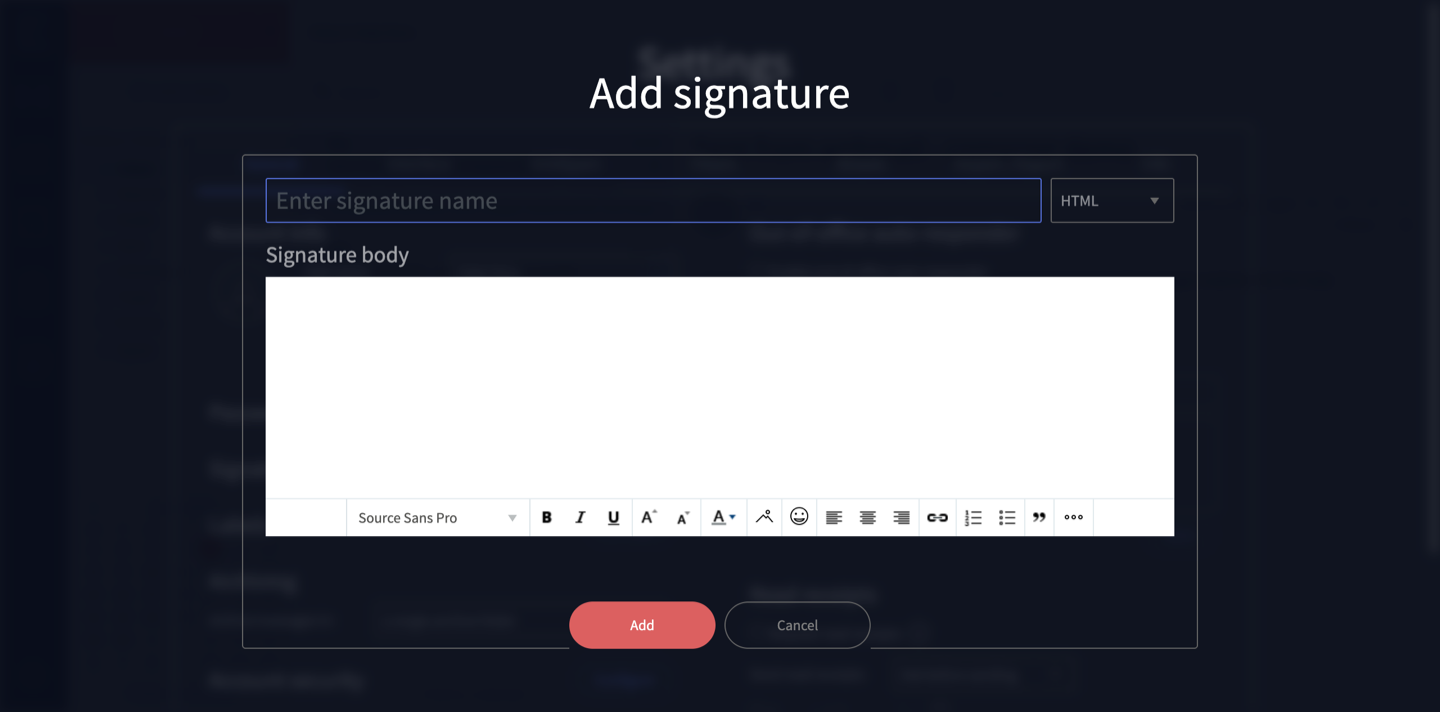
In the Add signature dialog, type a name for the signature in the Enter signature name box — this is just a label so you can recognise it later (for example, Main signature).
-
Type the signature itself in the Signature body box. This is a rich-text editor, so you can make text bold, change the size or colour, add a link, and use lists. A simple signature might be:
Jane Smith Smith & Co 02 4900 0000
-
Click Add to save it (or Cancel to back out without saving).
Check it appears on new messages
Once saved, your signature should be added when you write a new message. The quickest way to be sure is to start a new email and look at the bottom — if your signature is there, you’re set.
If it doesn’t appear automatically, there may be a separate setting that controls which signature is used by default. Have a look around the Signatures section on the General tab, and if you can’t spot it, get in touch and we’ll sort it out.
Need a hand?
The exact wording can vary slightly between webmail versions. If you can’t find the Signatures option, or your signature isn’t showing up where you expect, contact us or call 1300 024 766 and we’ll help.
Didn't work, or not sure?
No worries — that's what we're here for. Tell us what step you got up to and what you saw, and we'll sort it with you.